Early access · the clipboard built for AI
Everything you copied,
in one paste to AI.
Copy as you go, press Ctrl+Alt+V, and pick how it lands: plain text, Markdown, a PDF, a file, or the whole collection at once.
Windows and Mac. Founders window: 14 days from the day checkout opens, closing 11:59 pm Sydney time.
Ask anything
Browser demo: a note, code and a screenshot are collected. Pick Paste collection.
Recorded in the app
See it in the real app.
Three short clips of the early access (beta), recorded on Windows with our own test content. The app's fan has its own set of tools. No sound.
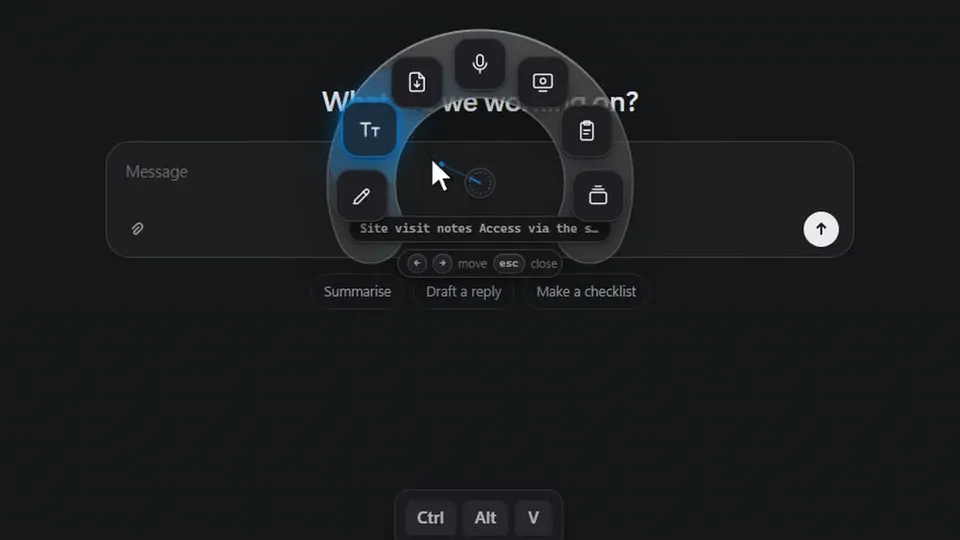
The paste fan. Press Ctrl+Alt+V in a chat box and the fan opens at your pointer. Pick a tool and it pastes.
The paste fan. Press Ctrl+Alt+V in a chat box and the fan opens at your pointer. Pick a tool and it pastes.
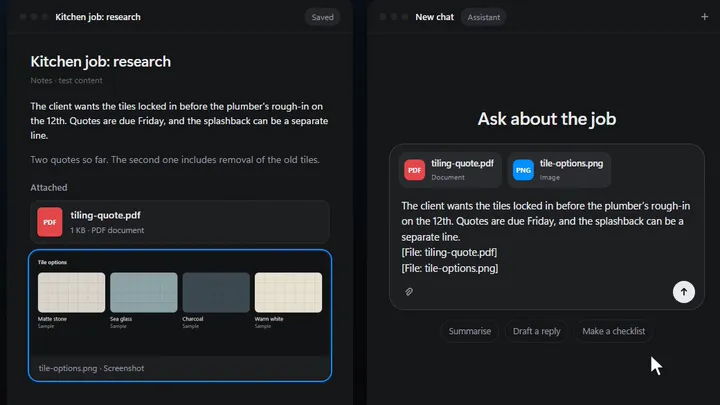
Collect. Copy a note, a PDF and a screenshot. Then paste all three into the chat in one go.
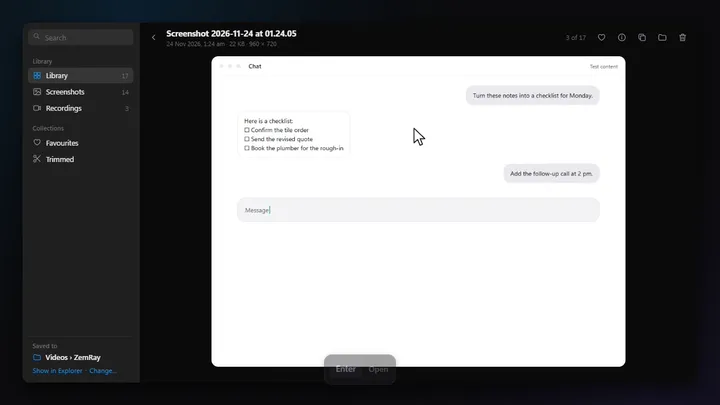
The library. Every screenshot and recording, kept like your photos. Open one and step through with the arrow keys.
One shortcut. Five jobs done.
Copy as you go. Press Ctrl+Alt+V. Pick how it lands.
-
The paste fan
Press Ctrl+Alt+V and a fan of tools opens right at your pointer. Paste as plain text, Markdown, a PDF or a file, into the app you were already using.
-
History and Collect
Everything you copy is kept, searchable, on your computer. Turn on Collect, copy several things, then paste them all at once.
-
Hold to talk
Hold a key, say what you mean, let go. Your words land where you were typing. Voice goes to our speech service to become text, unless Private mode is on.
Meetings
Record a call with your computer's sound and your microphone, and get a timed transcript. One click copies it, ready for your AI chat.
-
Capture and library
Grab an area or a window, mark it up, or record it. Every screenshot and recording lands in a library, kept like your photos.
Founders · early access (beta)
Help shape ZemRay. Pay US$10 a month while you do.
For people who paste into AI all day. Founders get the early access on Windows and Mac now, and every update as it lands.
- US$10 a month during the beta. We'll ask for your honest feedback. Your price never depends on it.
- Stays US$10 a month for 6 months after the official release.
- Months 2 and 3 free. You pay US$10 when you join, then nothing for your second and third months.
- Then the standard US$19 a month. We email you before your price changes.
For comparison: 6 months at the standard price would be US$114. A founder's first 6 months come to US$40.
What's included
- The paste fan on Windows and Mac: plain text, Markdown, PDF or a file, right at your pointer.
- Clipboard history and Collect: copy several things, paste them all at once.
- Hold to talk: speak, let go, and your words land where you were typing.
- Screen capture, markup and recording, kept in a library like your photos.
- Meetings: record a call, get a transcript, copy it for your AI chat.
- Every update during the beta, and a direct line to the founder.
What happens next
- 1Pay US$10
- 2Download for Windows or Mac
- 3We check in that it installed OK
Privacy
Your things stay on your computer.
ZemRay keeps what you copy so you can paste it again. It doesn't record your keystrokes.
- No account, no cloud copy. Your clipboard, screenshots, recordings and meeting transcripts are saved on your computer.
- Password managers skipped. Copies that password managers mark as private are skipped.
- Voice is the one exception. It's sent to our speech service to become text, with your saved voice words, unless Private mode is on. With Private mode, your voice never leaves your computer.
- No tracking here either. This website has no analytics, no advertising pixels and no tracking cookies.
FAQ
Before you join.
Is ZemRay a keylogger? It sees everything I copy.
No. ZemRay doesn't record your keystrokes. It keeps what you copy so you can paste it again, and that history stays on your computer. Copies marked private by password managers are skipped. There's no ZemRay account and no cloud copy of your clips.
What leaves my computer?
Only your voice, when you hold the key to talk, along with any words you've added under Settings › Voice › Your words (to help spelling), a random install number and the app version. It goes to our speech service to be turned into text, and the text comes back. We don't keep the recording, and we never log your words. Turn on Private mode in Settings › Voice and ZemRay downloads a speech model once (about 490 MB); after that your voice never leaves your computer. Meeting notes are always written on your computer.
Why does my computer warn me when I open it?
ZemRay is in early access and isn't signed yet (on a Mac, not notarised by Apple either). That's why Windows may show a blue SmartScreen box and a Mac asks you to confirm. On Windows, choose More info, then Run anyway. On a Mac, right-click ZemRay in Applications, choose Open, then Open again; on newer macOS, if it still won't open, go to System Settings › Privacy & Security and choose Open Anyway. The page after checkout walks you through it, and we reply if you get stuck.
Mac or Windows?
Both, in early access. On Windows it lives in the tray, on a Mac in the menu bar. The founder price is the same on either; it covers your own computer. Press Ctrl+Alt+V on Windows, ⌃⌥V on a Mac.
I'm on my phone. Can I still join?
Yes. Join now and your download links are on the next page and in your email, ready for when you're at your computer.
When do the 2 free months happen?
Your second and third months are free. You pay US$10 to join, nothing for months 2 and 3, then US$10 a month.
What does "honest feedback" mean? Do I have to give it?
Tell us what works, what breaks and what you wish ZemRay did. A two-line reply to our emails counts. We'll ask a few short questions now and then. It's asked, not required: your price and your free months don't depend on it. You don't have to be nice about it; honest is the point.
What happens when ZemRay is officially released?
Your price stays US$10 a month for 6 months from the release date. After that it moves to the standard US$19 a month, and we email you before it does. The release date isn't set yet; founders hear it first.
How do I cancel? Can I get a refund?
Cancel any time in a few clicks, or reply to your welcome email and we'll do it for you. You keep ZemRay to the end of the month you've paid for. Separately, if it's not for you, ask within 14 days of joining and we refund your first US$10. These promises sit on top of your rights under the Australian Consumer Law, not instead of them.
How does the first US$10 refund work?
Reply to your welcome email within 14 days of joining and say you'd like it back. No form, no reason needed. We refund it to the card you paid with, and your subscription is cancelled so nothing else is charged.
What happens after the founders window closes?
The founders price is for people who join in the 14-day founders window, which closes at 11:59 pm Sydney time. After that, new members pay US$19 a month. If you've joined, your price doesn't change.
Copy as you go. Paste it once.
Early access (beta) on Windows and Mac. Your clips stay on your computer.